Queue Worker
Note: This feature is included for OpenFaaS Standard & For Enterprises customers.
The Queue Worker is part of the built-in queue system for OpenFaaS built upon NATS JetStream.
It's a batteries-included solution, that's used at scale by many OpenFaaS customers in production every day.
Async invocations can be submitted over HTTP by your own code or through an event-connector.
This page is primarily concerned with how to configure the Queue Worker.
You can learn about asynchronous invocations here.
Popular use-cases include:
- Batch processing and machine learning
- Resilient data pipelines
- Receiving webhooks
- Long running jobs
Terminology
- NATS - an open source messaging system hosted by the CNCF
-
NATS JetStream - a messaging system built on top of NATS for durable queues and message streams
-
A JetStream Server is the original NATS Core project, running in "jetstream mode"
- A Stream is a message store it is used in OpenFaaS to queue async invocation messages.
- A Consumer is a stateful view of a stream when clients consume messages from a stream the consumer keeps track of which messages were delivered and acknowledged.
Installation
Embedded NATS server
For staging and development environments OpenFaaS can be deployed with an embedded version of the NATS server without persitance. This is the default when you install OpenFaaS using the OpenFaaS Helm chart.
If the NATS Pod restarts, you will lose all messages that it contains. This could happen if you update the chart and the version of the NATS server has changed, or if a node is removed from the cluster.
External NATS server
For production environments you should install NATS separately using its Helm chart. NATS can be configured with a quorum of at least 3 replicas so it can recover data if one of the replicas should crash. You can also enable a persistent volume in the NATS chart for additional durability.
See Deploy NATS for OpenFaaS for instruction on how to configure OpenFaaS and deploy NATS.
Queue mode
The queue-worker can operate in two modes, configured via the mode parameter:
jetstreamQueueWorker:
  mode: static | function
-
static(default) - the queue-worker uses a shared NATS Consumer scaled based upon the number of replicas of the queue-worker. Requests are processed in FIFO order. With a shared consumer, a single function that receives a large burst of invocations can dominate the queue, starving invocations for other functions until the backlog clears. This is the default mode, and ideal for development, or constrained environments. -
function- the queue-worker creates a dedicated NATS Consumer per function on demand. This gives each function its own view of the queue, so a burst of invocations for one function does not block or delay processing for other functions. It also enables queue-based scaling and adaptive concurrency.OpenFaaS for Enterprises feature
Function mode requires OpenFaaS for Enterprises.
When using function mode, the inactiveThreshold parameter can be used to set the threshold for when a function is considered inactive. If a function is inactive for longer than the threshold, the queue-worker will delete the NATS Consumer for that function.
jetstreamQueueWorker:
  mode: function
  consumer:
    inactiveThreshold: 30s
Features
Queue-based scaling for functions
OpenFaaS for Enterprises feature
This feature requires OpenFaaS for Enterprises and function mode.
In function mode, each function gets a dedicated NATS Consumer, making it possible to scale individual functions based upon the depth of their queued asynchronous requests.
See: autoscaling based on queue depth
Adaptive concurrency
OpenFaaS for Enterprises feature
This feature requires OpenFaaS for Enterprises and function mode.
Without adaptive concurrency, the queue-worker sends invocations as fast as it can pull them from the queue. If a function cannot keep up, this can lead to:
- Excessive error responses and wasted retries
- The need to fine-tune retry parameters for each function individually
Adaptive concurrency automatically learns how many concurrent invocations each function can handle:
- Increases the limit after successful responses (2xx)
- Backs off after rejections (429)
- Adjusts in real-time as replicas scale up or down
It is enabled by default in function mode but can be disabled to get the legacy behaviour:
jetstreamQueueWorker:
  adaptiveConcurrency: false
Example
Deploy the sleep function with capacity-based autoscaling, a max_inflight hard limit of 5, and a maximum of 10 replicas:
faas-cli store deploy sleep \
  --label com.openfaas.scale.max=10 \
  --label com.openfaas.scale.target=5 \
  --label com.openfaas.scale.type=capacity \
  --label com.openfaas.scale.target-proportion=0.9 \
  --env max_inflight=5
Submit 500 asynchronous invocations:
hey -m POST -n 500 -c 4 \
  http://127.0.0.1:8080/async-function/sleep
Without adaptive concurrency, the queue-worker pushes invocations as fast as it can. The single replica accepts the first 5 but rejects the rest with 429 status codes. Those rejected requests are retried with exponential back-off, wasting time and resources.
With adaptive concurrency enabled, the queue-worker backs off as soon as it receives 429 responses, holding the remaining requests in the queue. It periodically probes the function, and as the autoscaler adds replicas to handle the load, the queue-worker detects successful responses and increases the concurrency limit, draining the queue without unnecessary retries.
Metrics and monitoring
Get insight into the behaviour of your queues with built in metrics.
Prometheus metrics are available for monitoring things like the number of messages that have been submitted to the queue over a period of time, how many messages are waiting to be completed and the total number of messages that were processed.
An overview of all the available metrics can be found in the metrics reference
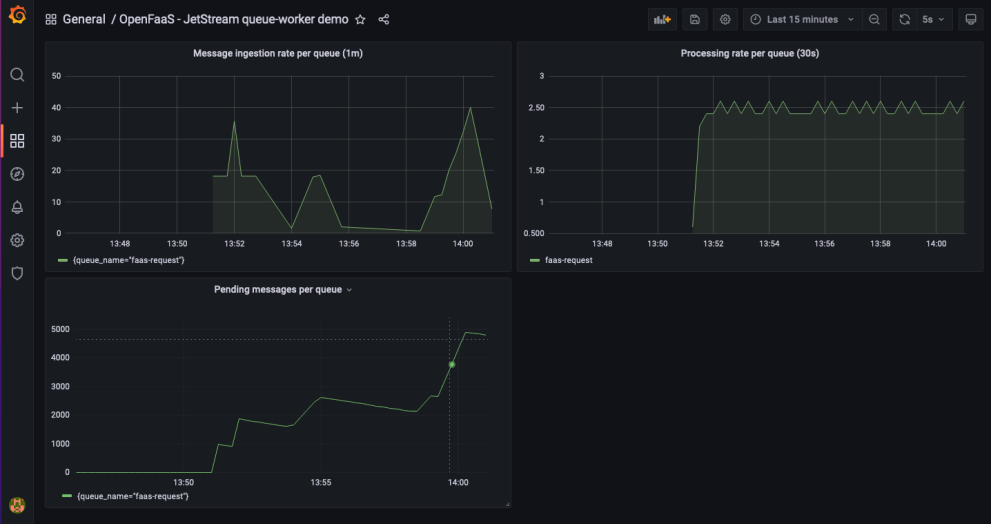
Grafana dashboard for the queue-worker
Multiple queues
OpenFaaS ships with a “mixed queue”, where all invocations run in the same queue. If you have special requirements, you can set up your own separate queue and queue-worker using the queue-worker helm chart.
See: multiple queues
Whitelist callback URLs
The queue-worker can restrict async callback URLs to trusted endpoints only, helping prevent untrusted callback destinations in production.
See: restrict async callback URLs
Retries
Users can specify a list of HTTP codes that should be retried a number of times using an exponential back-off algorithm to mitigate the impact associated with retrying messages.
See: retries
Structured JSON logging
Logs from the queue-worker can be formatted for readability, during development, or in JSON for a log aggregator like ELK or Grafana Loki.
You can change the logging format by editing the values.yaml file for the OpenFaaS chart
jetstreamQueueWorker:
  logs:
    format: json
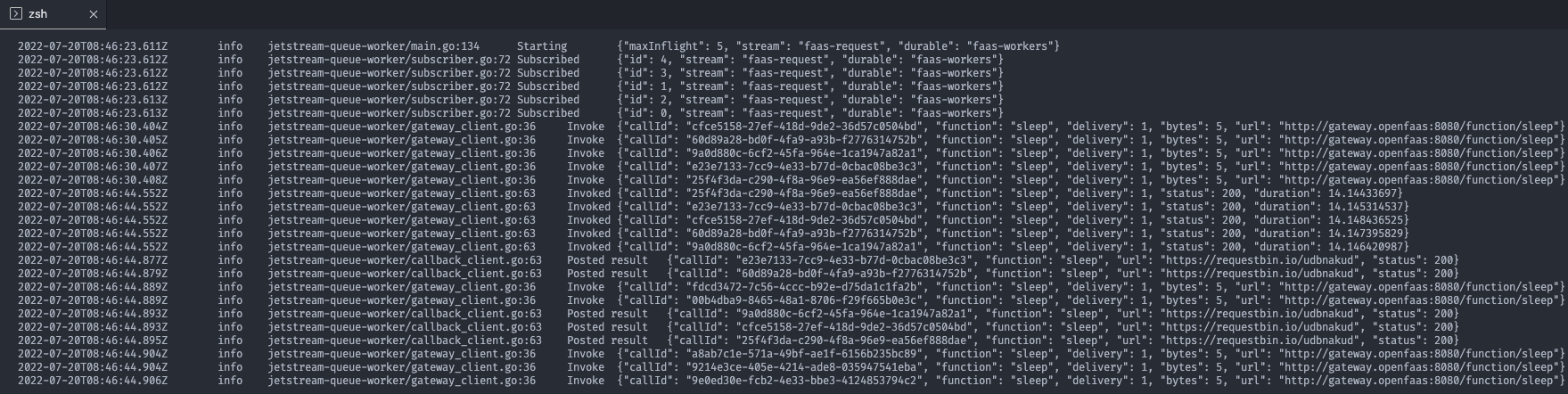
Structured logs formatted for the console
Clear or reset a queue
From time to time, you may wish to reset or purge an async message queue. You may have generated a large number of unnecessary messages that you want to remove from the queue.
Each queue-worker deployment creates a dedicated NATS Stream to store async invocation messages. On startup the queue-worker will create this stream if it does not exist. To reset Keep in mind that all queued invocations will be lost.
The stream is automatically created by the queue-worker of it does not exist. Simply deleting the stream and restarting the queue-worker will reset the stream and consumer.
-
Get the NATS CLI
Download the NATS CLI or use arkade to install it.
arkade get nats -
Port forward the NATS service.
kubectl port-forward -n openfaas svc/nats 4222:4222 -
Delete the queue-worker stream.
Keep in mind that deleting the stream removes any queued async invocations.
# This example deletes strean for the OpenFaaS default queue named faas-request. # The stream name is always the queue name prefixed with OF_. # Replace the queue name with the name of the queue stream you want to delete. export QUEUE_NAME=faas-request nats stream delete OF_$QUEUE_NAME -
Restart the queue-worker deployment.
kubectl rollout restart -n openfaas deploy/queue-worker
Deploy NATS for OpenFaaS
NATS JetStream is a highly available, scale-out messaging system. It is used in OpenFaaS Pro for queueing asynchronous invocations.
The OpenFaaS Helm chart installs NATS by default, but the included configuration is designed only for development or non-critical internal use.
By default, NATS runs with a single replica and no persistent storage. This means:
- If the NATS Pod goes down, all asynchronous OpenFaaS requests will fail until it comes back online.
- Pending messages are not stored persistently, so they are lost if the Pod or node crashes.
- All queued messages are lost during redeployments or when the NATS service restarts.
The default setup is often sufficient for development or staging, but it is not suitable for production. For reliable operation, production systems need additional configuration to provide high availability and data durability.
The next section describes our recommended configuration for a production-grade installation of OpenFaaS with an external NATS deployment.
Configure a NATS Cluster
Deploy NATS in your cluster using the official NATS Helm chart.
A minimum of three NATS servers is required for production. This ensures that message processing can continue even if one Pod or node fails.
The Helm chart deploys NATS as a StatefulSet. To avoid a single point of failure it is recommended to schedule each Pod on a different Kubernetes node.
At the networking level, the clustering in NATS uses Gossip to announce basic cluster membership, and Raft to store and track messages. If you experience issues, check your network policies and security groups allow for these protocols.
Add the following to the values.yaml configuration for your NATS deployment:
config:
  cluster:
    enabled: true
    replicas: 3
  jetstream:
    enabled: true
It is recommended to add a topology spread constraint to ensure Pods are distributed across different nodes:
podTemplate:
  topologySpreadConstraints:
    kubernetes.io/hostname:
      maxSkew: 1
      whenUnsatisfiable: DoNotSchedule
Enable persistent volumes
Persistent Volumes (PV) is how Kubernetes adds stateful storage to containers. Applications define a Persistent Volume Claim (PVC), which is fulfilled by a storage engine, resulting in storage being provisioned, and then attached to the container as a PV.
The NATS Helm chart enables file storage for JetStream by default. The PV can be configured through a template in the NATS Helm chart.
In your values.yaml file for the NATS Helm chart:
config:
  jetstream:
    fileStore:
      enabled: true
      dir: /data
      pvc:
        enabled: true
        size: 10Gi
The size value will depend on your own usage. We suggest you start with a generous estimate, then monitor actual usage.
If not specified the default storage class will be used. You can use a different storage class by setting the config.jetstream.fileStore.pvc.storageClassName parameter.
When running on-premises, if you do not have a storage driver, you can try Longhorn from the CNCF.
On AWS, EBS volumes are recommended.
Deploy NATS
Deploy NATS with your custom configuration values:
helm repo add nats https://nats-io.github.io/k8s/helm/charts/

kubectl create namespace nats
helm upgrade --install nats nats/nats --values nats-values.yaml
Connect OpenFaaS to an external NATS server
Update the values.yaml configuration for your OpenFaaS deployment to point to your external NATS installation:
nats:
  external:
    enabled: true
    clusterName: "openfaas"
    host: "nats.nats"
    port: "4222"
Stream replication settings
Each OpenFaaS queue is backed by a dedicated JetStream stream. To protect messages against node or Pod failures, streams should use replication.
The replication factor determines how many servers store a copy of the data:
- Replicas = 1 – Default in OpenFaaS: fastest, but not resilient. A crash or outage can result in message loss.
- Replicas = 3 – Recommended for production: balances performance with resilience. Can tolerate the loss of one NATS server.
- Replicas = 5 – Maximum: tolerates two server failures but with reduced performance and higher resource usage.
For production environments, set the replication factor to at least 3 in the OpenFaaS Helm configuration:
nats:
  streamReplication: 3
See the NATS documentation on stream replication for more details.