Air Gap with Kubernetes
OpenFaaS Standard and OpenFaaS for Enterprises are licensed for use within an airgap when purchased on an annual basis via invoice.
You can use your own choice of tooling to mirror images and bundle the Helm chart(s) required for your installations, or you can use our own purpose-built airfaas tool.
Mirror OpenFaaS images into your own registry
If your organisation has a policy of mirroring all consumed images from vendors into a private registry, then airfaas mirror can help you with this, even if you don't install OpenFaaS into an airgapped environment.
faas-cli plugin get airfaas
Mirror all images for the given chart/index to a custom registry:
faas-cli airfaas mirror \
    openfaas/openfaas \
    --registry ttl.sh
Mirror the Kafka-connector's images:
faas-cli airfaas mirror \
    openfaas/kafka-connector \
    --registry ttl.sh
The -f/--file flag can be used to write a values.yaml file with the mirrored image names, which can be used as an overlay to your existing values.yaml file when deploying OpenFaaS.
The --url flag can be used to specify a different Helm chart repository. The only requirement is that images are stored in the same format as OpenFaaS: i.e. image: or componentName.image:.
Note: if you receive an access denied error from ghcr.io, it's most likely because you have an old, expired access token in your local Docker config or keychain. Run docker logout ghcr.io to clear the token and try again.
Consume the mirrored images from your own registry
There are two options for consuming the mirrored images:
- Use the
registryPrefixsetting to add a prefixed string i.e. your registry to the image name across all images i.e.registryPrefix: aws_account_id.dkr.ecr.us-west-2.amazonaws.com/openfaas - Use the generated generated values.yaml file produced by running
arifaas mirrorwith the--fileflag as an overlay to your existingvalues.yamlfile.
Option 1 - Use the registryPrefix setting
registryPrefix: aws_account_id.dkr.ecr.us-west-2.amazonaws.com/openfaas
If you need a custom image pull secret for the registry, create it and then add it to the imagePullSecrets section of the values.yaml file.
imagePullSecrets:
  - name: ecr-pull-secret
For certain registries such as AWS ECR, it's possible to use the ambient AWS IAM credentials to authenticate the registry without overriding the default imagePullSecrets setting.
Option 2 - Use the generated values file produced by airfaas as an overlay to your existing values.yaml file.
Run faas-cli airfaas mirror with the --file flag to generate a values.yaml file with the mirrored image names e.g:
faas-cli airfaas mirror \
    openfaas/openfaas \
    --registry aws_account_id.dkr.ecr.us-west-2.amazonaws.com/openfaas \
    --file values-mirror.yaml
The resuling file should looke like this, with all images updated to point to the mirrored registry:
gatewayPro:
  image: aws_account_id.dkr.ecr.us-west-2.amazonaws.com/openfaas/openfaasltd/gateway:0.4.27
alertmanager:
  image: aws_account_id.dkr.ecr.us-west-2.amazonaws.com/openfaas/prom/alertmanager:v0.27.0
autoscaler:
  image: aws_account_id.dkr.ecr.us-west-2.amazonaws.com/openfaas/openfaasltd/autoscaler:0.3.6
Your final OpenFaaS Pro installation may look something like, where you use the standard values-pro.yaml file, your own settings in values-staging.yaml, then finally the mirrored images overlaid over that in values-mirror.yaml:
helm upgrade --install openfaas \
  --install openfaas/openfaas \
  --namespace openfaas \
  -f values-pro.yaml \
  -f values-staging.yaml \
  -f values-mirror.yaml
Perform an offline installation
Airfaas can perform an offline installation of OpenFaaS into an airgapped environment. It will bundle the Helm chart(s) and images required for the installation, then restore the images into an offline registry, and install OpenFaaS using the Helm chart(s) from the local filesystem.
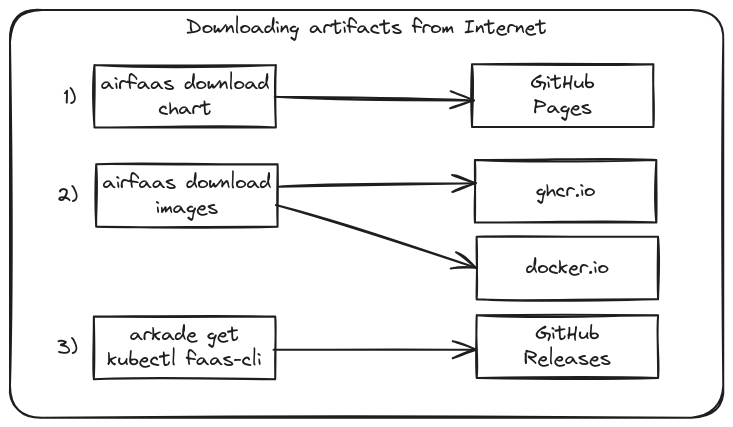
The download process
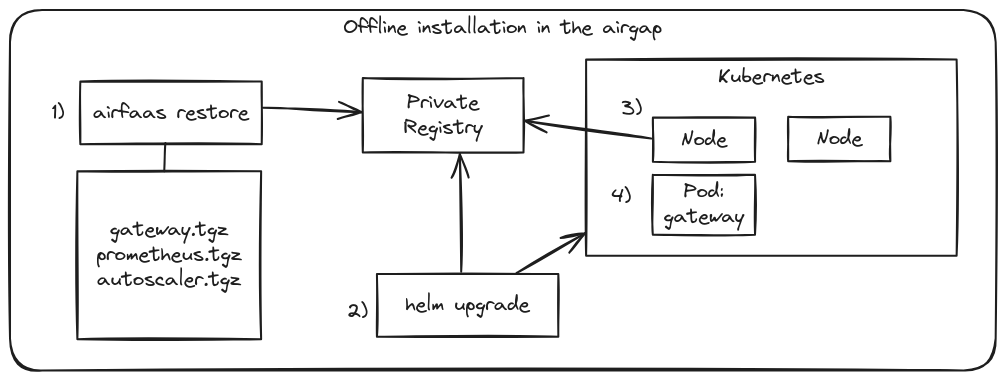
The upload / installation process
Follow the instructions in: Deploy airgapped Serverless Functions with OpenFaaS